AA News Conference Highlights: New planes, upgraded cabins, and reader giveaway

By now, you’ve probably read the news about American’s plans for new planes and upgraded aircraft, and while those announcements got most of the attention, there were some other interesting items that I thought you might find interesting.
I had hoped to provide live coverage, but alas, for safety reasons, Gogo Inflight Wifi doesn’t work below 10,000 feet, so lacking a decent connection, a few Tweets from my iPhone were the best I could do (note to self, buy a 4G LTE Verizon iPad which includes mobile hotspot service).
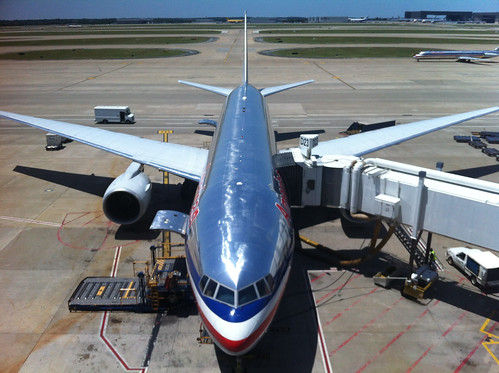
The press conference was held at DFW on board an American Airlines 777-200 parked at Terminal D: gate 23. When I got the airport (I live in Dallas, so I didn’t have far to travel) I was met at the central lobby by a couple of people from AA’s communications team and they gave me boarding pass to get through security.
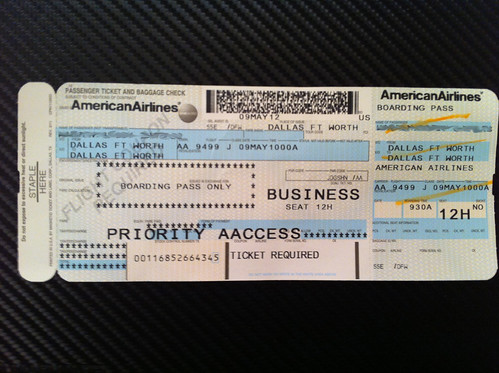
Interestingly, the boarding pass/press pass was issued with an actual flight number: AA 9499. AA flight numbers in the 9000 range are usually used for positioning or maintenance flights, so when I saw that we had been assigned a flight number, I looked it up on FlightAware to see if a flight plan had been filed. Other than a DC to Las Vegas flight back in November, FlightAware didn’t have anything listed for flight 9499.

When I got the aircraft, I was greeted by American Airlines Flight Attendant Kazumi Chapa, who I instantly recognized from the in-flight safety video. I chatted with her for a bit about the video and asked if she was often recognized by passengers. She said that frequent fliers will usually recognize her, especially after they hear her voice.
Kazumi told me that she’s been an AA fight attendant for 23 years and that she loves her job. She said that if anything, she was born 20 years too late, and that she would have loved to have been a “stewardess” back in glamorous early days of jet travel, when the cabin crew changed outfits at various stages during a flight. She was wonderful, and it was a great treat to meet her.

Someone else I recognized and was able to meet: Maya Leibman. The popular and well known past President of the AAdvantage program is now the Chief Information Officer at American. Before she led the AAdvantage team, she had served as AA’s VP of IT Services, so I asked her if she enjoyed being back over on the technology side of AA. She said that she was enjoying the challenge.
She also said that she had a lot of fun while she was over at AAdvantage, and particularly enjoyed being able to meet so many of American’s customers. She felt that she had benefited from the experience by gaining a deeper understanding of how customers use technology, what was most important to them, and how technology could be used to enhance the customer experience.
Anyway, she and Phillip Easter, Director of Mobile Apps at American, were on hand to demonstrate how they are using mobile technology behind the scenes to improve the customer experience.
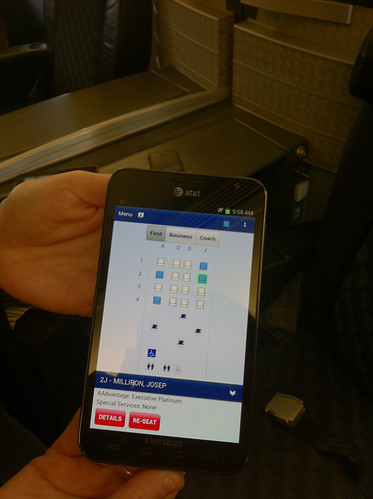
Heres’ a look at an app that they’re testing with flight attendants that replaces the passenger information print out that accompanies every flight. Some of the info that it displays: a passenger’s elite status, ConciergeKey status, seating assignment, Admirals Club membership, any special assistance requirements, destination, origin, and connection details. It updates dynamically, so that it’s always up to date and reflect changes in a passengers flight times, seating assignments, and connection information.

I was also given a demo of the app that ConciergeKey and 5-Star agents use to assist passengers with their connections. Rather than carrying a cipboard, they use Samsung tablets so that the always have the latest arrival and departure times, seating assignments, connection information, etc. It’s even used as a display card with an arriving passenger’s name.
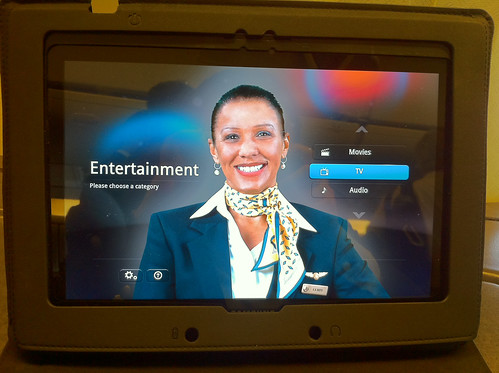
American introduced Samsung Galaxy Tab entertainment devices last year and has been offering them to premium class passengers on international and trans-continental flights. I’ve encountered them before, and I like them. Bobby, a purser who I think I recognize from a few trans-continental flights) was demonstrating and answering questions about the tablets. He said that passengers feedback has been very positive and that the tablets are so easy to use, few passengers ever have any tech support questions.
Here’s a look at the interface in action.
Last year American upgraded their international First Class service with new menu items, expanded wine selections, and upgraded amenity kits. They became the first U.S. carrier to offer turn-down service in First Class and introduced new pillow, duvets, slippers and pajamas (speaking of which, they gave me some PJs and an amenity kit, so now I’m trying to think an idea for a fun reader giveaway this summer).


It didn’t occur to me until I was taking the tour, but that was my first visit to the fist class cabin on an AA 777. I’ve been in Business Class often enough on their 777s, but I’ve never been to the front of the plane. I knew what it looked like, and I’ve read plenty of trip reports over the years, so I was familiar with the layout, but I was surprised by the size and it felt much more spacious than I expected.

Rob Friedman, American Airlines Vice President – Marketing, showing the upgrades to some journalist.
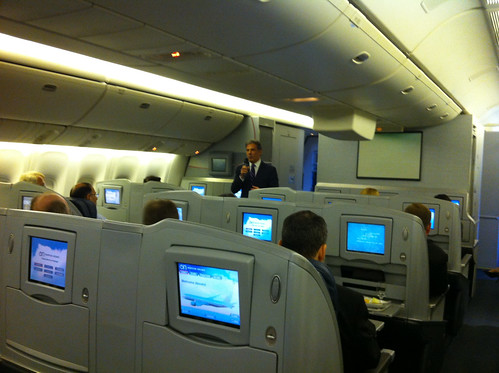
After the tour of the cabin, everyone settled into their assigned seats for the press conference. Breakfast was served. Here’s a look at the Scrambled Eggs and Chorizo, over Biscuit from the Premium Class menu that was created for American by Chef Richard Sandoval.

The big announcements were about new planes and upgraded cabins.
777-300ER
The new Boeing 777-300 are still on schedule to be delivered and put into service during the 4th quarter of this year. As announced earlier, the new planes will feature a new generation of seats and interiors.
First Class and Business Class will have the fully lie-flat seating and aisle access from every seat.
Main Cabin Extra, their premium economy seating, will be offered on the new planes.
Regular economy will also get new seats, new in-flight entertainment systems, power ports at ever seat.
Satellite based wifi will be offered on the international routes served by the new planes.
777-200
Something that had been rumored, became official. American will refurbish and update their current fleet of 777-200 by removing First Class and upgrading the Business Class cabin. The 772’s will feature the same, fully lie-flat seats that are being installed in the new 777-300s, and the rest of the plane will be upgraded with new seats, entertainment systems, Main Cabin Extra, and satellite based wifi.
The new Business Class seats are very close to the current First Class seating that they offer, and by switching to the two cabin configuration, American will more closely match the product offered by their partners and their competitors.
767-300
American will retire about half their fleet of 767-300s and refurbish the remaining with the new Business Class seats and Main Cabin Extra. Because the 767s will be facing retirement not too far into the future, they won’t be configured with wifi.
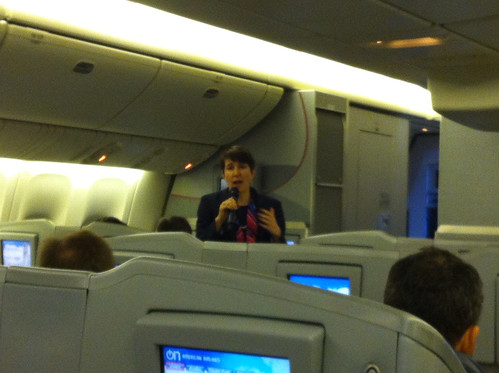
Because I’m frequently an AA passenger, and because of the blog, I was familiar with the upgraded premium amenities, the new menus, the Galaxy Tabs, AA’s mobile technology efforts, and most of the other improvements they’ve made to their product, but this was the first time they presented all of these efforts at once, so it was good to get a wider perspective of things.
What they didn’t say, but would also seem to have been part of their message, was that they continue to be focused on running a business, investing in their product, and planning for the future. And that’s a very good thing too.
Win 1,000 AAdvantage Miles and a Gourmet Cookie!
So that brings us to a reader giveaway: I’ve got 1,000 AAdvantage Miles and a Triple Shot Cookie by Chef Marcus Samuelsson to give away.
To enter, all you have to do is leave a reader comment answering this question: Pixel or Paper? Do you prefer to print out your boarding pass or do you use the mobile boarding pass?
I’ll have a random drawing Monday morning. The deadline to enter is Sunday night, 11:59 Pacific. One entry per person.
Good luck and have a great weekend!!
Pixel – go green or go home 🙂
That said, I always have a bit of anxiety that something won’t work when I use a digital boarding pass. This will likely change with use.
Pixel. I need less paper in my life.
Paper. I don’t have to remember my charger…
Pixel!
Paper, hard to collect pixels.
I use both. Will print out from home, then use the mobile while on the road, although connectivity is sometimes a problem.
Pixel
I use a mobile boarding pass if I’m traveling on the carrier itself or for domestic flights. I’ll use a printed boarding pass if I’m traveling on a partner airline or for international flights — just in case I run into any problems.
Paper, never fails to scan, don’t have to worry about connectivity. I’ll use pixels if in a hurry, but prefer to have a paper backup at least.
I like the idea of pixels, but there are too many things that can go wrong so I usually use paper.
paper.
When you’re in a hurry, pixel’s nice — but the fumbling around with your phone can be a pain when you’re carrying bags around with you. I like having the option of paper if I have to talk to an agent/check bags, but if I’m doing just carryon, I’ll just stick with mobile and breeze by the checkin desk.
I still like the classic paper boarding pass (with an electronic backup). There’s something romantic about a pair of paper tickets.
Paper. But maybe next time I’ll try pixel with paper backup.
Paper, even though I want to go green. So maybe pixel. Ok, final answer: Paper.
Paper. But having both options would be nice.
I’m green, so no paper, but they have to setup well those electronic readers machines.
paper. just in case.
Paper, for scrapbooks of special trips
Always paper. I don’t have to worry about it scanning/not scanning and being connected to the internet. Also, if the flight doesn’t post it is easy to get the information I need to send AA.
Paper! Too many things can go wrong with a mobile device.
Paper – always better to have proof when claiming missing miles
still doing paper, but considering a switch to pixel!!
Pixel whenever I can.
Paper. (Pixel for insurance.)
paper – easy to prove mileage in case partner flights dont post.
isaac
Pixel! Although I haven’t tried it yet
Pixel… except when travelling through ORD – the readers at ORD could be painful at times.
Definitely paper. It is easier to get missing credit for miles with paper. Too often the pixel boarding pass is gone the minute the flight takes off.
Paper! Especially when the boarding pass is printed out on thick card stock. 🙂
I prefer pixel but always go with paper – been caught to many times when teh scanner does not work or it does but in the other queue!
I like the idea of pixel, but have never used it. Too scared of getting bullied by the TSA workers… so I stick with paper.
I’m usually traveling with my family, and I don’t think pixel works yet for multiple passes at a time, so it’s still paper for me (for now).
Pixel starting in 2013…
Paper since I get to collect the BPs.
Paper… it’s easier to scrapbook that than a phone!
Paper I have a scrap book of all my flights:)
Paper – pixel is great but all too often the scanner (mostly at TSA) can’t read it.
Paper since I haven’t completely advanced to the 21st century and don’t own a smart phone!
Paper, though I prefer green paper to blue paper
Paper — to add to the stack of BPs waiting for me to enter them into Flight Memory.
Pixel! It’s fun showing off how it works when people ask.
I have used some of the mobile boarding passes, but I always have a paper backup.
Pixel! Much easier to keep up with!
Pixel
Paper-what can I say? Batteries die!
mobile boarding pass, faster and greener !
Paper, its nice to have something in your hand.
Paper, easier to fold into my pocket.
Pixel …. the future is Eco friendly
Pixel – saving the trees
Paper, so I can keep playing AA Sudoku on my phone
Paper… Never locks up and need rebooting!
Pixel- however I also take a screenshot as my backup of the boarding pass because I’ve been caught with no signal at the gate agent. I can pull it up in “photos”.
Paper; print before going to airport.
Paper because I like holding the document before boarding
paper
paper because the pixel is fickle sometimes and doesn’t work properly.
Paper. It makes a nice souvenir. I tried using a mobile app before and couldn’t get it to pull up again at the gate, so they had to print it anyway.
Paper, printed at home. Watching some guy miss a flight at -28 minutes to takeoff because he didn’t have a boarding pass and the counter agents refused to check him in, even without checked bags, was all I needed to see to never again not have a boarding pass with me . . .
Paper. Sorry to be old school but don’t always get the connectivity required. What a fun event you attended. BTW… Love the slippers I won in a give away a few months ago. They are in the bag I take on weekly trips and I wear them in the various hotel rooms I stay in week to week.
Nice report about the press event!
I’ll stick with paper for now.
Paper – doesn’t need batteries.
Paper … For various reasons !
It would have to be paper…I don’t trust electronics
Pixel, what it is to say??? It is fungo have a boarding pass in your electronics, hey I even try it a fess weeks ago ,really a surreal experience walking up and down with my cellphone, definetly will try it up again in an AA flight!!!
Both.
paper… too busy texting.
Paper – I have used Pixel – but my Phone seems to have the knack of going into sleep mode as I get to TSA and Boarding….
I am surprised you never got the fly at the front of the Bus when they ran a 777 from DFW-ORD – I managed to get upgraded into there twice
Paper! It always works.
Paper!
Pixel
Pixel of course!
paper… good as a bookmark too. my attempts to get the phone to place hold on my kindle have not gone well.
Paper copy for my collection
I prefer pixel. Whenever I have the option, I prefer checking in via mobile boarding pass.
Paper. I don’t need lots of other people touching my cell phone.
Paper
Paper — no need to worry about a last-minute technology fail
Paper, just in case miles don’t post
Pixel. Don’t have to worry about forgetting to print anything
PIXELS Absolutely. Saves time and trees of course, but the digital image can’t smear (from heat or friction) or fade (from sun light) or get wrinkled up like the paper boarding passes do.
Paper, check in online, print the BP at the airport at kiosk.
paper please
Paper. I’ve been having issues with my smartphone recently and just don’t trust everything to be readily accessible. Maybe I’ll change my mind once I upgrade.
Paper
Pixel! I’m a tech geek!
I’m all for being green but I have to go with paper due to the numerous issues the scanners tend to have when I go the mobile phone boarding pass route.
Go Mobile!
I prefer digital, mainly because sometimes I don’t have access to a printer, so it grew into a habit…
I prefer electronic. Paper just gets in the way.
Print
Print.
Prefer mobile passes, but always get a print out for my records!
Paper. I had some issues with my Iphone.
Paper, for sure.
Print. Ever had an electronic wizard malfunction?
Pixel, because I’m a tree hugger, but my ancient phone tends to give them problems 🙂
Definitely Paper, with my luck my battery would die & I would miss my flight!
paper ticket..don’t have mobile phone…love to win the cookie and 1k AA miles
I recommend both, running late for a flight once we were unable to connect the phone to the network and were unable to load the image for security, further delaying us. Two lessons there, don’t be late and be prepared.
I prefer electronic. Better for our little planet.
I never rely on my phone to be available and/or charged when I need it for something as important as a boarding pass 🙂
I print at home and carry it with the rest of the confirmations just in case and if needed I reprint at the airport from the kiosk.
Pixel
I go for both. Once phone died en route to airport.
Paper..As someone said above, it is hard to collect pixels.
Paper.
Paper – I don’t own a smartphone.
Paper, please.
Paper as a backup is the best, but i really like having them electronic on hte phone.
I prefer paper
Mobile, I always find it hard to find the boarding pass when I look through my pockets, which are full of other slips of paper
Paper!
Paper. I don’t want to be the guy holding up the line trying to line up my phone just right
Mobile boarding pass all the way.
The trick was learning how to “lock” my phone so the pass would stop spinning around on the screen every time I moved.
Paper. It never has glitch.
Paper
Always print it
Pixel, all the way!
Always print it as I don’t trust the reliability of my Smart Phone.
pixel.
Pixel. Love the looks I get from old people at security.
Paper!
Definitely mobile boarding pass
I still doing both – always printed out two BPs anyway. The pixel doesn’t always work at DCA
Pixel all the way!
old school – paper
I always use mobile when available, but sadly the technology is far from seamless. Hopefully, the more people who use it, the better the business case and data become for future improvements. The potential is fantastic, but this iteration of technology leave much to be desired!
Paper — I think it’s faster. I’ve seen people have issues with getting their phones to scan.
Paper – mobile boarding pass has been a disappointment on multiple occasions.
Paper– always easier and more reliable.
pixel….one less thing to carry to the airport.
I still print mine when I get to the airport. I’ve gotten into dead spots just as I need my boarding pass, and so I’d rather not take that chance. The mobile’s good as a backup, however, as I’ve lost my boarding pass somewhere along the way before.
Paper please
Paper – never know if your phone will give up on you…
Paper
Print–a lot less room for error
Print out.
Paper. Less room for error and a handy place to take notes. The “green” argument doesn’t stick with me: paper’s a renewable, recyclable resource. Often more renewable than the energy used to charge your phone. Increasing paper demand fuels tree supply, which creates a greener world. Just remember to recycle.
I prefer a printed pass.
I print it out because it is safer!
paper… and I save them ALL up each year.
Paper. Paper does not run out of batteries.
Paper. I haven’t tried the app yet because I use a Blackberry, and Blackberry utterly sucks when it comes to apps.
Definitely print!
Pixel. Updates automatically
Paper
paper
Paper please! Nothing like having something solid in your hand when the apps crash or you run out of power!
Paper. More reliable to scan.
Pixel all the way. Especially from DFW!
I’m a pixel fan — use it all the time and keeps from having to look for which pocket or bag I stuffed the boarding pass.
The old school paper boarding passes. 🙂
Paper boarding pass
Paper please!
Pixel!
paper
electronic boarding pass!!
paper
paper
I prefer paper printing at home.
Thanks
Paper – not bring phone on international travel
Paper (specifically, cardstock). I go out of my way to get “real” boarding passes, meaning card stock, from an agent. They fit in my pocket, they don’t get as shredded as home-printed, they are easy to store, and they look cool.
Either is fine with with me, I think it would be easier to keep up with an electronic version.
Paper. 🙂
I do prefer paper. Preferably cardstock.
I print that puppy. More can go wrong with pixels than with paper.
I tried doing the mobile version but it was too unreliable. Back to paper for me!
Pixel! Let’s save some paper
i will print out that boarding pass. Someday, somewhere tht copy might be needed and digitally you are screwed.
Doubts? Review this topic in a year and ask if anyone whom had not printed that paper wished they did when needed most?
paper ticket printed.
i’ll save the next tree
paper for me
Definitely paper…makes for good memorabilia!