

Yesterday I posted about United bringing back “Expert Mode” after removing the functionality a few weeks ago. On that post reader MM asks the following:
Can the newbs get a tutorial on understanding “expert” mode and the supposed benefits?
Of course! For those of you not familiar with “Expert Mode” it’s basically a feature by which you can see availability in various fare classes for United flights. In order to use it you have to go to this page and opt-in while logged into your MileagePlus profile.
Once you’ve opted in simply search for any flight as you usually would. For example, I searched for Newark to Los Angeles on October 5.
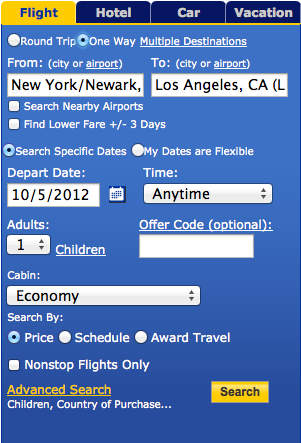
Once you find the flight you want click the “Fare Class” text which appears at the far right of the flight information.

Once you click it a bunch of numbers and letters will show up.
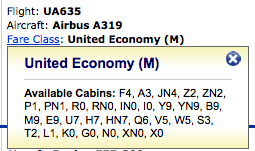
As you can see there are always letters with numbers next to them. The number next to the letters is the number of seats available in that “bucket.” The highest number you’ll ever see is “9,” so even if the flight is completely empty you’ll never see more than “9” seats appear at once.
The breakdown of fare buckets in this case is as follows:
- F, A, P, and Z are paid first/business class fare buckets (in descending order). As you can see above the flight is “F4,” meaning there are four first class seats for sale, and the lower the fare class, the fewer of those seats they’re willing to sell at that price.
- Y, B, M, E, U, H, Q, V, W, S, T, L, K, and G are paid coach class fare buckets (in descending order). As you can see the flight is “Y9,” meaning there are at least nine coach seats for sale, and the lower the fare class, the fewer of those seats they’re willing to sell (for example, they’re only willing to sell one seat in the “L” bucket and no seats in the “K” bucket).
- R is the bucket for upgrades from coach to the next class of service (first class on a two cabin plane, or business class on a three cabin plane). As you can see the flight is “R0,” meaning there’s currently no confirmable upgrade space, which isn’t surprising given that only four seats are left for sale. As a result any upgrades would be waitlisted at this point.
- While it’s not applicable here, “ON” is upgrade space from business to first class on a three cabin plane, so that’s the bucket you would look for if you wanted to upgrade from business to first class.
- “O” is Star Alliance first class award space, “I” is Star Alliance business class award space (though on two cabin flights, like this one, first class would book into the “I” bucket), and “X” is Star Alliance coach award space.
- “ON” is additional first class award space for Platinum elites and up, “IN” is additional business class award space for Platinum elites and up, and “XN” is additional coach award space for all elites. As you can see with the above example, there isn’t any extra space in any of those buckets on this flight.
- For non-elites “FN” is standard first class award space, “ZN” is standard business class award space (again, domestic first class books into this bucket), and “HN” is standard coach award space. For elites standard first class award space is “FN,” standard business class award space is “JN,” and standard coach award space is “YN.”
So why is this useful?
- It gives you an idea as to whether there’s any confirmable upgrade space for the flights you’re looking at, and also how likely your upgrade is to clear at your “window.”
- It gives you an idea of how much availability United is releasing in each “bucket,” which gives you a good idea of whether it’s important to lock in a ticket right away or whether you probably have some time to make a decision (though obviously availability can change rapidly even if a flight appears wide open).
- It gives you a good idea of how full your flight is and whether it might need volunteers.
Hope that answers your questions, and if you have any others, let me know!



Hi!
Great article! Hoping you can provide some additional insight on where I should start for:
I have already booked and been ticketed for an United MileagePlus award itinerary with the following segments:
Seattle to Toronto on Air Canada in Econ
Toronto to Paris on Air Canada in Econ
Paris to Athens on Aegan Air in Biz Class
Athens to Instabul on Turkish Airlines in Biz Class
Istanbul...
Hi!
Great article! Hoping you can provide some additional insight on where I should start for:
I have already booked and been ticketed for an United MileagePlus award itinerary with the following segments:
Seattle to Toronto on Air Canada in Econ
Toronto to Paris on Air Canada in Econ
Paris to Athens on Aegan Air in Biz Class
Athens to Instabul on Turkish Airlines in Biz Class
Istanbul to Houston on Turkish Airlines in Biz Class
Houston to Seattle on United Airlines in Econ Class
I would like to try and upgrade on my Toronto to Paris segment, but am confused on where to start...Should I call United or should I call Air Canada to discuss my options? Can you provide any additional details on what my best options might be?
Thanks!
Note: (Adding to post above), I have no status.
Thanks.
If I have an award economy ticket H9 class on a 3 class United transatlantic flight, and on expert mode, it says F1, FN1, A0, ON0, O0, J9, JN9, C9, D9, Z9, ZN9, P0, PN0, R0, RN0, IN0, I0, Y9, YN9, B9, M9, E9, U9, H9, HN9, Q9, V0, W0, S0, T0, L0, K0, G0, N0, XN0, X0
is there a possibility this can be upgraded with more miles? Can I call and ask to be waitlisted with more miles?
Thanks.
@ BT -- You can only waitlist if you paid for the higher class of service already. In your shoes I'd keep an eye on availability, and if/when business class award space opens up you can make the switch.
When you purchase an upgrade using a credit card, is the cost the same as if you had purchased that class of ticket to begin with?
@ SantaCruzRonnie -- Sometimes, sometimes not. All depends on the circumstances.
What is the easiest way to get an upgrade on United on an international flight when your employer has paid for an economy ticket and you have to pay the difference between coach and business class?
@ DonMinneapolis -- Assuming you don't have systemwide upgrades, your best bet is to use use miles plus pay a co-pay to try and lock in the upgrade. Good luck!
Lucky
Thank you. I just joined United's FF, so I don't have any miles yet. I have gobs of miles on KLM, but I don't believe there is any way to transfer between the two. Thanks again.
@ DonMinneapolis -- Correct, unfortunately you can't. That being said, you could always apply for a credit card which earns United miles to start building up your mileage balance with them towards an upgrade. Some of them have 45,000+ mile sign-up bonuses.
Thanks. I also think you purchase upgrades with a credit card if I am not mistaken. Just trying to flesh out my options.
Hi - I have logged in to United website using my MP number. I don't see the expert mode or opt-in anywhere to see enable expert mode. Can someone please guide me to proper navigation.
Thanks.
I am trying to book a domestic ticket in United. On the expert mode, here is the fare class that I see - F2, A2, JN2, C2, D2, Z0, ZN0, P0, PN0, R0, RN0, IN0, I0, Y9, YN9, B9, M9, E9, U9, H9, HN9, Q9, V9, W9, S9, T9, L9, K9, G9, N9, XN9, X9. When I search for flights by entering specific fare class, it shows no tickets available for any class below V. Why is it so?
Hi,
Do you have any insights on award tickets upgrades for United Club card holders? My husband (silver and united club card holder) and I (platinum) are flying to Brasil on an award business-first class ticket. If the plane is a 3-class plane... would that qualify us to be wait-listed for global upgrade?
@ Lynda -- Unfortunately that applies to domestic flights only. Sorry.
Hi Lucky, United.com is no longer making fare class clickable, anyway to use expertflyer to find R class availability?
Thanks!
@lucky - I hear you. I'm wondering if they oversell flights, will it say Y4 for instance but still be overbooked? Or do in fact most VDB actions being at Y=0?
@ GretelNick -- Zero, ideally, which would mean the flight is sold out.
Volunteers are likely when F=0 and Y=??
Unfortunately the Expert Mode seems to have disappeared.
@ Carol -- Airlines are constantly adjusting their inventory. "9" is the most space that will display in any bucket, so it could be that there are 15 upgrade seats, but the most they'll show is "R9." But even if it's "R0" now it could be that it's "R9" tomorrow, as they're constantly playing with the space they release. So if the upgrade is important to you I'd confirm it with an RPU.
Thanks so much for this tutorial. I still have more questions about the upgrades. So, what happen if all of the First Class seats are still available and you mention that only R9, 9 seats are available for upgrade, is that mean that the rest of the First Class will be empty or those will be given to those with RPU or GPU instead of CPU's? I'll be flying on the Dreamliner at the end...
Thanks so much for this tutorial. I still have more questions about the upgrades. So, what happen if all of the First Class seats are still available and you mention that only R9, 9 seats are available for upgrade, is that mean that the rest of the First Class will be empty or those will be given to those with RPU or GPU instead of CPU's? I'll be flying on the Dreamliner at the end of Dec and there are still plenty of seats left. I don't know if I should take my changes or just use one of my RPU to confirm my upgrades?
@ Rebecca D. -- That's what you'll want to keep it at.
When selecting my Preferences which fare type should be selected? Right now I have Lowest Fare Available With Restrictions selected. Thanks!
@jmd001: or you could have looked up above, where Seth, you know, posted a link to it... ;)
Ben: one thing that might not be super clear in the post is that the economy buckets are non-duplicative. So Y9 B9 doesn't mean that they are willing to sell 18 seats, of which 9 are Y and 9 are B. It means they're willing to sell 9 seats, which can be either Y or B.
Might also want to point out the need for an underlying published fare to hook up with the buckets.
Thanks, @ffi. That's it.
I kept looking under "United" for the script, not "Continental". Silly me! :D
I think it was Seth at the Wandering Aramean blog next door who had the script.
http://boardingarea.com/thewanderingaramean/2011/08/continental-expert-mode-now-on-steroids/
Ben--
Excellent tutorial.
Could you include a link to the Grease Monkey script that color codes the award/upgrade buckets with Bold Red for zero availability and Bold Green for non-zero? I've installed it, but failed to write down the details of how/where I got it. And "Search" on FT has so far failed me.
@ Zach -- While some agents don't charge the fee, they are supposed to charge the $150 fee at US Airways.
thanks for the quick response as always! I've always confused R with I for some reason.. this is definitely appreciated. I've got a trip to China (Intl Business) booked with my wife coming up in Oct - wife is booked with UA miles while I booked myself with US miles. I know UA will re-book her in first for me for no additional charge...but do you know if US would charge for re-booking?
@ youreadyfreddie -- Thanks!
@ Scott -- Well the seatmap really isn't an accurate indicator of availability. For example, a group of 40 could be booked on a flight but not have seats selected, so the seat looks wide open while it's actually full.
whats the advantage to checking expert mode to see how full the flight is, for bump opportunities, as opposed to just viewing the seat map?
As usual, you rock, Lucky! Thanks for this.
That FlyerGuide page is woefully out of date, Lucky. A number of the classes are misrepresented there. An up to date version is here: http://boardingarea.com/thewanderingaramean/2011/10/decoding-fare-buckets-on-the-new-united/.
And, for people who want to see the "expert mode" information more easily and who use a GreaseMonkey-capable browser the script here is VERY useful.
@ Jim in PHL -- Thanks for the link!
@ Michael -- Thanks!
@ Zach -- There's no special fare class for waitlisted upgrades. For a domestic segment in two cabin first class you'd be looking for "I" class to open up.
Ben, would there be a fare class for award standbys? For example if I'm confirmed in international First but the domestic leg is economy and waitlisted.
Thanks a lot Ben. Great post, as usual.
I would consider this post to contain a more up to date description of UA's booking codes than the wiki link you provided:
http://www.flyertalk.com/forum/united-mileageplus-consolidated/1270547-decoding-alphabet-soup-new-fare-buckets-ua.html
@ Lincoln Park -- Thanks!
@ Eric -- Each airline has different fare classes. Here's a further explanation of United fare classes:
http://www.flyerguide.com/wiki/index.php/Booking_Classes_%28UA%29
You do have to click on the Fare Class link. Hovering does not work, though on the old UA (pre March 3) site hovering was how you viewed this information.
Thank you, this post is quite helpful.
How do you know what the fare class letters mean? Are these the same or different across other airlines?
Wow, great post! Still very much of a newbie in all of this, but this first time I've seen such a thorough listing AND more importantly EXPLANATION of United's various fare codes. This makes the Expert Mode so much more understandable for me! Great job Lucky!
@ Michael -- This page will show you the cost to upgrade and eligible fare classes for various types of tickets:
http://www.united.com/web/en-US/apps/mileageplus/awards/travel/awardTravel.aspx
Which fares can be upgraded with miles on United? How do those upgrades work?