Google Launches “Share Item Location” in Find Hub for Android
Google has unveiled a new feature during Mobile World Congress, with work on their Find Hub being featured. For travellers, there will be something quite important rolling out – “Share Item Location”.
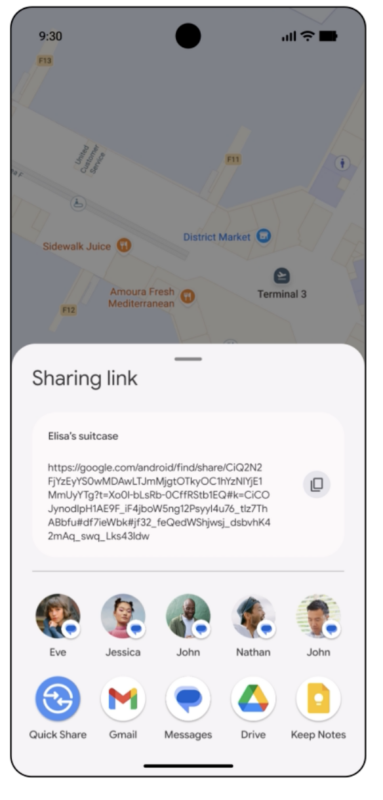
It is similar to Apple’s “Find My Share My Item Location” function. It will give you a new way to help you find lost luggage at the airport, and hopefully a greater peace of mind while you travel.
Android’s Find Hub can now locate items, whether you are looking for a misplaced checked bag for a long-haul flight or just your carry-on.
According to Google, the Find Hub app lets you see your items on a map. If your luggage goes missing, you can take action right from the app. With the new share item location feature, you can generate a secure link to your bag’s location and share it directly with a participating airline, giving them the information they need to locate it.
Here’s how to do it:
- Find and share: In the Find Hub app, select your lost item and tap “share item location” to generate a unique, secure URL.
- Provide to the airline: Copy the secure link and paste it into the airline’s mobile app or website so they can see the item’s location as it updates.
- Stop sharing anytime: You can immediately stop sharing your item’s location right from the app.

Your items and tags
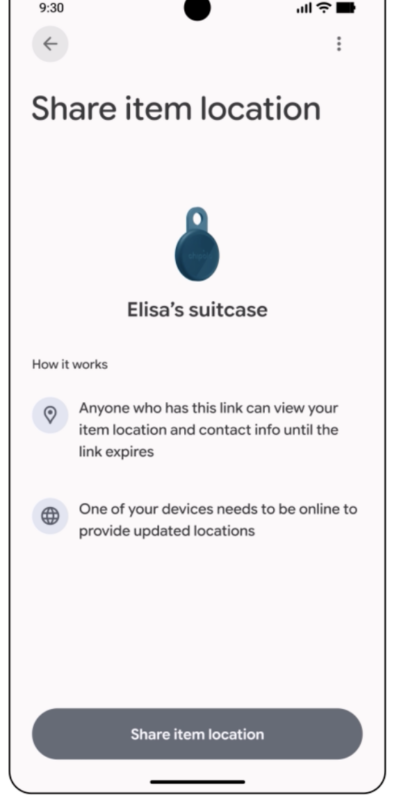
Setting up the item sharing
Generate a sharing link.
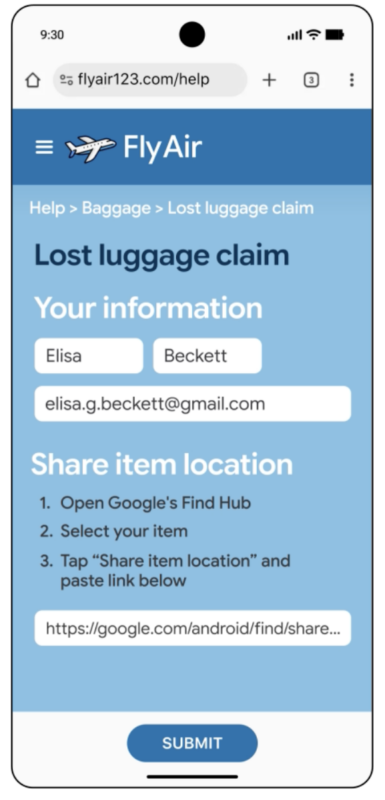
Paste the link to the airline, and you’ve got more information to share.
Google has designed the Find Hub network with your privacy as a priority, so that you can control who can see your item’s location and device location data is encrypted.
In addition to being able to stop sharing at any time, links automatically expire after seven days for added protection. Sharing is also disabled as soon as your phone detects that the item is back with you.
Initial Partnerships
With it going live, partnerships will be important so you can use it when you need it most. At launch, the Google “Share Item Location” is available with:
- Ajet
- Air India
- China Airlines
- Lufthansa Group (Lufthansa, Austrian Airlines, Brussels Airlines, and Swiss International Airlines)
- Saudia Airlines
- Scandinavian Airlines
- Turkish Airlines
These airlines now accept Find Hub locations as part of their baggage recovery process, with more, such as Qantas, coming in the near future.
Google has also collaborated with both SITA and Reunitus to integrate this technology into WorldTracer and NetTracer, the industry’s leading baggage-tracing systems. Together, these platforms power the recovery operations for hundreds of airlines at thousands of airports worldwide. This ensures that whether a passenger is flying with a major carrier or a regional partner, the tools to locate missing bags are more interconnected and effective than ever.
Providing reassurance when travelling
Tools like Google’s Find Hub and Apple’s Find My are important for travellers (and idiots like myself who misplace things). It helps both locate items, as well as provide tracking information to airlines, who can help you find your bag when it decides to go on its own travels.
I’ve long been a fan of these devices, with them providing tracability/trackability as well as “where the hell did I leave X” (and to be honest, I wish I left one in my passport last time I travelled abroad).
Considering tags are a consumable cost these days, they offer a lot of knowledge for not a lot of money.
With the ability to share your item’s details with an airline, they become considerably more useful – especially if your bag has gone on its own journey around the country or globe.
Welcome to Economy Class and Beyond. Your no-nonsense guide to network news, honest reviews, in-depth coverage, unique research, as well as the humour and madness I only know how to deliver.
Our Social Media pool has expanded. You can find us across most networks as @economybeyond on BlueSky, Threads, Mastodon and Instagram!
Also, remember that we are part of the BoardingArea community, bringing you the latest frequent flyer news from around the world.
The post Google Launches “Share Item Location” in Find Hub for Android appeared first on Economy Class & Beyond.
Recent Stories
-
 Odd: Uganda Airlines Grounds A330neo Fleet For “Unscheduled Maintenance”
March 7, 2026
Odd: Uganda Airlines Grounds A330neo Fleet For “Unscheduled Maintenance”
March 7, 2026
-
 How to transfer Chase Ultimate Rewards to travel partners
March 7, 2026
How to transfer Chase Ultimate Rewards to travel partners
March 7, 2026
-
 Storm Causes Delta Meltdown In Atlanta, Passengers Trapped On Planes For Hours
March 7, 2026
Storm Causes Delta Meltdown In Atlanta, Passengers Trapped On Planes For Hours
March 7, 2026
-
 No Matter How Much You Pay Southwest Airlines, You Can’t Move to an Empty Seat [Roundup]
March 7, 2026
No Matter How Much You Pay Southwest Airlines, You Can’t Move to an Empty Seat [Roundup]
March 7, 2026
Reviews
-
 Review – Air France Lounge (Revisited) – Washington Dulles (IAD), Concourse A
March 7, 2026
Review – Air France Lounge (Revisited) – Washington Dulles (IAD), Concourse A
March 7, 2026
-
 Royal Caribbean’s New Royal Beach Club Cozumel: Everything We Know
March 6, 2026
Royal Caribbean’s New Royal Beach Club Cozumel: Everything We Know
March 6, 2026
-
 Is Hyatt Regency Étoile a good points option in Paris?
March 6, 2026
Is Hyatt Regency Étoile a good points option in Paris?
March 6, 2026
-
 NCL’s New Air Policy: Why You’re Now Forced to Fly a Day Early
March 5, 2026
NCL’s New Air Policy: Why You’re Now Forced to Fly a Day Early
March 5, 2026